nenupy.io.tf.TFTask
- class nenupy.io.tf.TFTask(name, func, args_to_update=[], repeatable=False)[source]
Bases:
objectClass to handle a single task/operation designed to be applied to time-frequency data.
Example
Here is a complete example of how a
TFTaskworks on its own.>>> from nenupy.io.tf import TFTask >>> from nenupy.io.tf_utils import TFPipelineParameters, _ValueParameter >>> import numpy as np # Generate a dataset >>> data = np.ones((5, 2, 1)) # time, frequency, polarization # Define a function that modifies the data >>> def multiply_by_first_axis_index(data: np.ndarray, scale: float) -> np.ndarray: >>> '''A completely made-up function''' >>> first_axis = np.arange(data.shape[0]) >>> return scale * data * first_axis[:, None, None] # Generate an object listing parameters available to the function(s) >>> custom_parameters = TFPipelineParameters( _ValueParameter( name="scale", default=1., param_type=float, min_val=0.1, max_val=2.0 ) ) # Generate a TFTask object >>> custom_task = TFTask( name="My task - custom", func=multiply_by_first_axis_index, args_to_update=["scale"] ) # Modify the value of the pipeline parameter >>> custom_parameters["scale"] = 1.5 # Update the TFTask, the new parameter value is taken into account >>> custom_task.update(parameters=custom_parameters) # Call the TFTask and run it >>> time_unix, frequency_hz, result = custom_task( time_unix=None, frequency_hz=None, data=data ) >>> print(result[:, 0, :].ravel()) [0. 1.5 3. 4.5 6. ]
- __call__(time_unix, frequency_hz, data, **kwds)[source]
Run the
TFTask. Before running the tasks, it is recommended to callupdate()first in order to take into account the most up-to-date values of the parmaeters that may be used by the task.- Parameters:
- Returns:
(time_unix, frequency_hz, processed data)
- Return type:
- __init__(name, func, args_to_update=[], repeatable=False)[source]
Generate a
TFTaskinstance.- Parameters:
name (
str) – Name of the task (it can be anything)func (
Callable) – Function that applies the operation to the dataargs_to_update (List[
str], optional) – List of parameter names that are extracted fromTFPipelineParametersand are required byfunc. These parameters will be updated by their current values (stored inTFPipelineParameters) prior to running the task., by default []repeatable (
bool, optional) – Allow or not the task to be called several times by a given pipeline, by defaultFalse
See also
Methods
__init__(name, func[, args_to_update, ...])Generate a
TFTaskinstance.TFTaskto correct for the sub-band bandpass response.TFTaskcallingde_faraday_data()to correct for Faraday rotation for a given'rotation_measure'set inparameters.TFTaskcallingcorrect_parallactic().TFTaskcallingapply_dreambeam_corrections().TFTaskcallingde_disperse_array()to de-disperse the data using the'dispersion_measure'set inparameters.TFTaskto flatten each sub-band bandpass.TFTaskto re-bin the data in frequency.TFTaskto compute the Stokes parameters by callingcompute_stokes_parameters().mitigate_frequency_rfi([sigma_clip, ...])TFTaskto perform RFI mitigation by sigma clipping usingmitigate_rfi_along_axis().mitigate_time_rfi([sigma_clip, ...])TFTaskto perform RFI mitigation by sigma clipping usingmitigate_rfi_along_axis().TFTaskcallingremove_channels_per_subband()to set a list of sub-band channels toNaNvalues.TFTaskto re-bin the data in time.update(parameters)Update the embedded function's arguments to those listed in
parametersthat matchargs_to_update.Attributes
List of embedded function's arguments to update before running the function.
Attribute modified by
update()which tells whether the configured parameters enable the embedded function usage.- property args_to_update
List of embedded function’s arguments to update before running the function. If
funccontains keyword arguments, their values will be updated by the matching key value during the call ofupdate().
- classmethod correct_bandpass()[source]
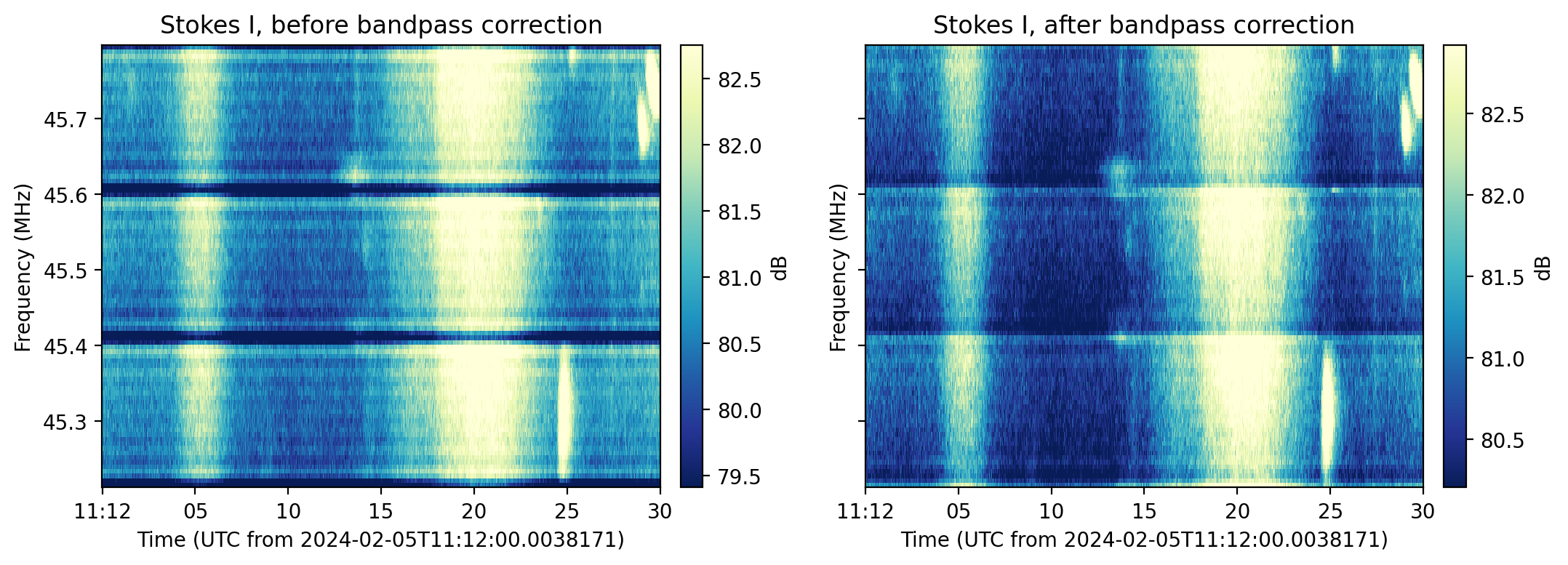
TFTaskto correct for the sub-band bandpass response.A Poly-Phase Filter is involved in the NenuFAR data acquisition pipeline to split the data stream into sub-bands. The combination of the filter shape and a Fourier transform results in a non-flat response across each sub-band. This
TFTaskcalls thecorrect_bandpass()function.Example
>>> from nenupy.io.tf import Spectra, TFTask, TFPipeline

>>> sp = Spectra("/my/file.spectra")
>>> sp.pipeline = TFPipeline(sp, TFTask.correct_bandpass())
>>> data = sp.get(...)
- classmethod correct_faraday_rotation()[source]
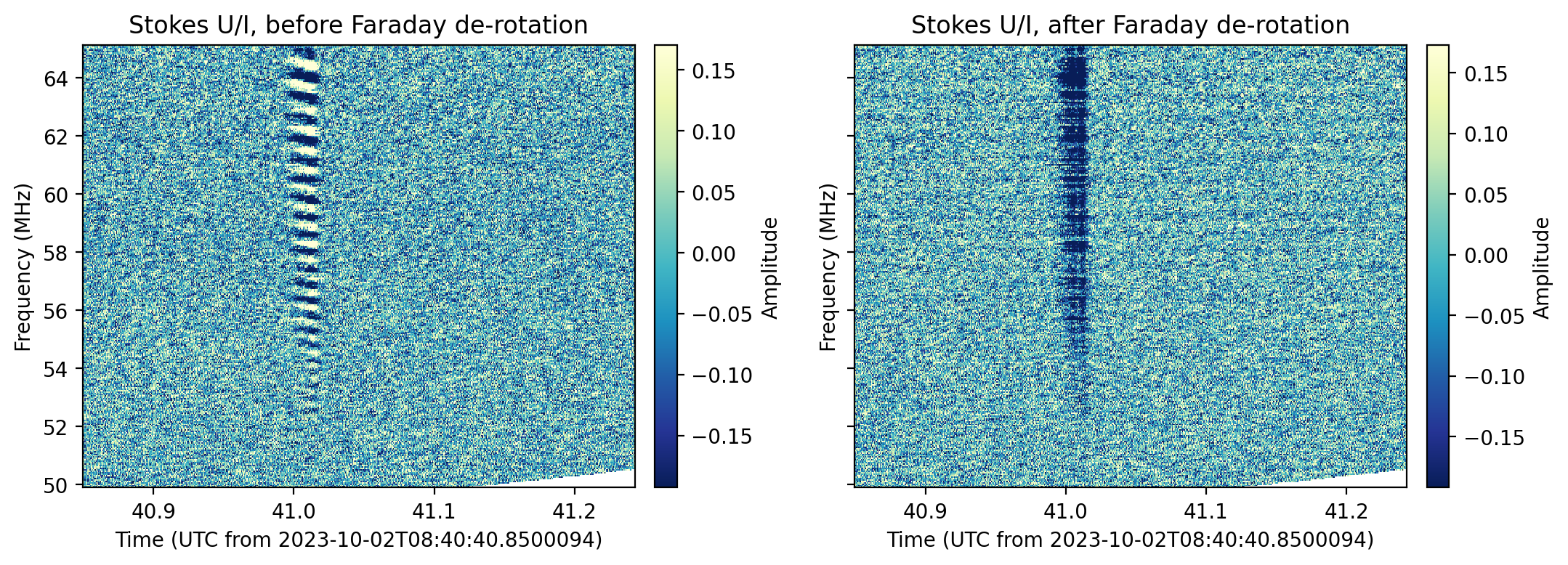
TFTaskcallingde_faraday_data()to correct for Faraday rotation for a given'rotation_measure'set inparameters.Example
>>> from nenupy.io.tf import Spectra, TFTask
>>> import astropy.units as u

>>> sp_pulsar = Spectra(".../pulsar.spectra")
>>> sp_pulsar.pipeline.set_default()
>>> sp_pulsar.pipeline.insert(TFTask.de_disperse(), 1)
>>> sp_pulsar.pipeline.insert(TFTask.correct_faraday_rotation(), 2)
>>> sp_pulsar.pipeline.info()
>>> defaraday_data = sp_pulsar.get(
        tmin="2023-10-02T08:40:40.8500000",
        tmax="2023-10-02T08:40:43.16000000",
        fmin=50,
        fmax=65,
        stokes=["U/I"],
        remove_channels=[0, 1, -1],
        rebin_df = 12207.03125 * 4 * u.Hz,
        dispersion_measure=2.972719 * u.pc / u.cm**3,
        rotation_measure=5.9 * u.rad / u.m**2
    )
>>> defaraday_data[:600, :, :].plot(polarization="U/I", db=False)
Notes
In the above example, we first had to de-disperse the data with
de_disperse().
- classmethod correct_parallactic_rotation()[source]
TFTaskcallingcorrect_parallactic(). This allows for parallactic angle correction by aplying the inverse rotation.Warning
This task must be computed early in the pipeline process as it involves full Jones operations.
- classmethod correct_polarization()[source]
TFTaskcallingapply_dreambeam_corrections(). This allows for beam correction (including leakage and parallactic angle correction).Example
>>> from nenupy.io.tf import Spectra, TFTask, TFPipeline
>>> from astropy.coordinates import SkyCoord
>>> import astropy.units as u

>>> sp = Spectra("/my/solar_observation.spectra")
>>> selection_tmin = sp.time_min
>>> selection_tmax = sp.time_max
>>> selection_fmin = 50 * u.MHz
>>> selection_fmax = 50.2 * u.MHz
>>> rebin_df = 1 * u.MHz
>>> rebin_dt = 60 * u.s
>>> mean_time = selected_time_min + (selected_time_max - selected_time_min) / 2
>>> sun = SolarSystemTarget.from_name("Sun", mean_time).coordinates

>>> sp.pipeline.insert(TFTask.correct_polarization(), 1)
>>> data_i_corr = sp.get(
        tmin=selection_tmin,
        tmax=selection_tmax,
        fmin=selection_fmin,
        fmax=selection_fmax,
        beam=0,
        stokes="I",
        remove_channels=[0, 1, -1],
        rebin_dt=rebin_dt,
        rebin_df=rebin_df,
        calib_dt= 20 * u.s,
        skycoord=sun,
        dreambeam_parallactic=True
    )
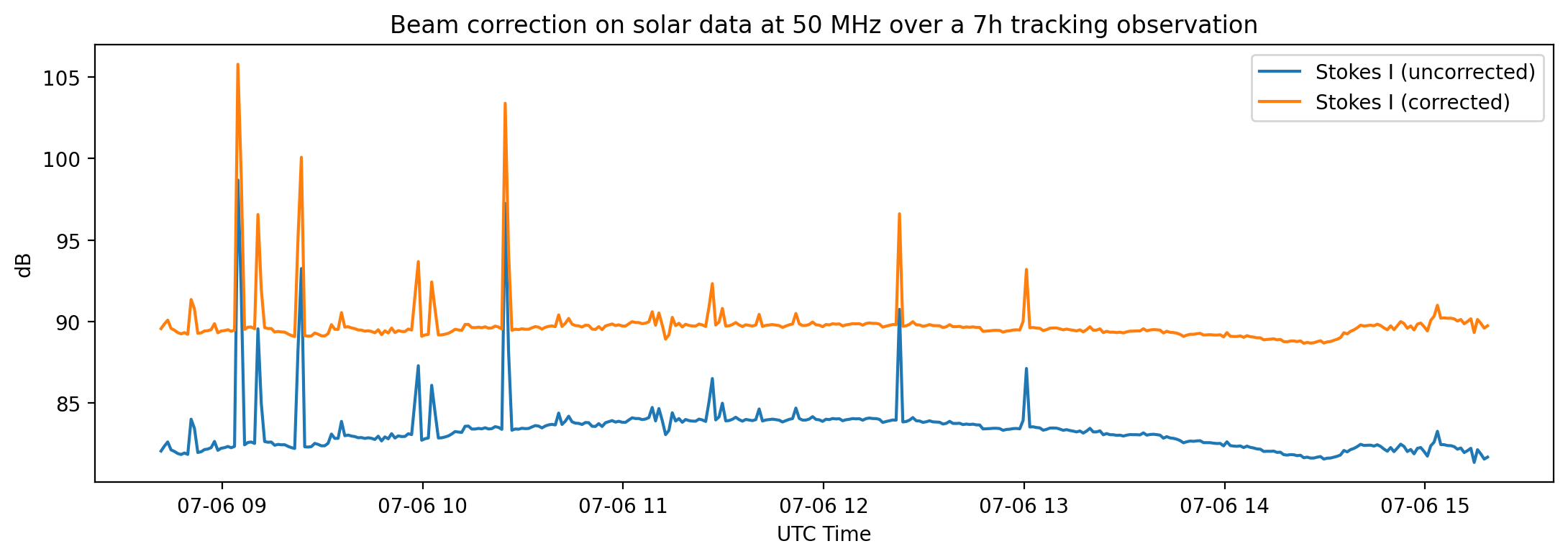
In this above example, the solar observation lasts for almost seven hours. During the tracking of the Sun, a variety of NenuFAR antenna gains are then explored. Since the dipoles are less sensitive near the horizon, the blue curve shows a bell-like pattern with minima at the time boundaries (when the Sun is at its lowest elevations) and a maximum during the culmination. The corrected data, in orange, are flatter, indicative of the beam correction.
Warning
This task must be computed early in the pipeline process as it involves full Jones operations. As of now, NenuFAR cross-polarization terms are not fully taken into account by DreamBeam. Results may vary and the tests we have made are not yet conclusive. We are working on an improved version.
- classmethod de_disperse()[source]
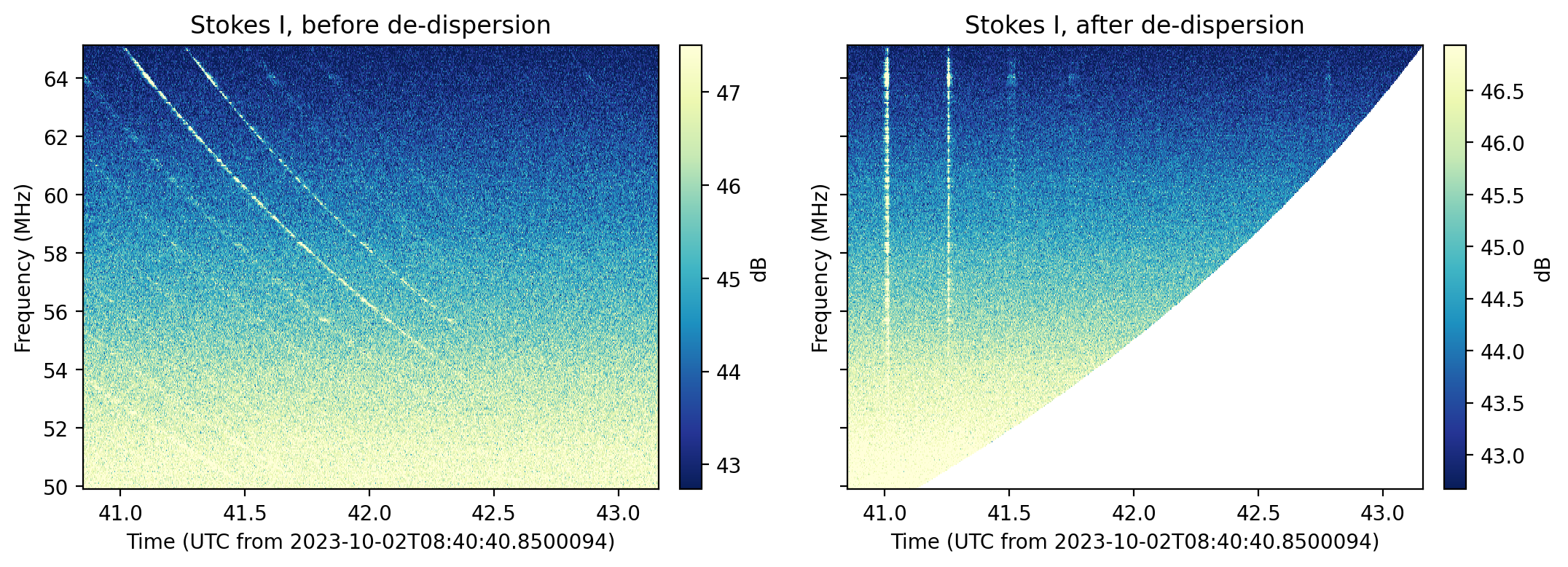
TFTaskcallingde_disperse_array()to de-disperse the data using the'dispersion_measure'set inparameters.Example
>>> from nenupy.io.tf import Spectra, TFTask
>>> import astropy.units as u

>>> sp_pulsar = Spectra(".../pulsar.spectra")
>>> sp_pulsar.pipeline.set_default()
>>> sp_pulsar.pipeline.insert(TFTask.de_disperse(), 1)
>>> sp_pulsar.pipeline.info()
>>> dedisperse_data = sp_pulsar.get(
        tmin="2023-10-02T08:40:40.8500000",
        tmax="2023-10-02T08:40:43.16000000",
        fmin=50,
        fmax=65,
        stokes=["I"],
        remove_channels=[0, 1, -1],
        rebin_df = 12207.03125 * 4 *u.Hz,
        dispersion_measure=2.972719 *u.pc / (u.cm**3)
    )
>>> dedisperse_data.plot(polarization="I", db=True)
Warning
Due to the configuration of the underlying
Array, itsdask.array.Array.compute()method has to be applied priori to de-dispersing the data. Therefore, a potential huge data volume may be computed at once. By default, a security exception is raised to prevent computing a too large data set. To bypass this limit, set'ignore_volume_warning'ofparameterstoTrue.
- classmethod flatten_subband()[source]
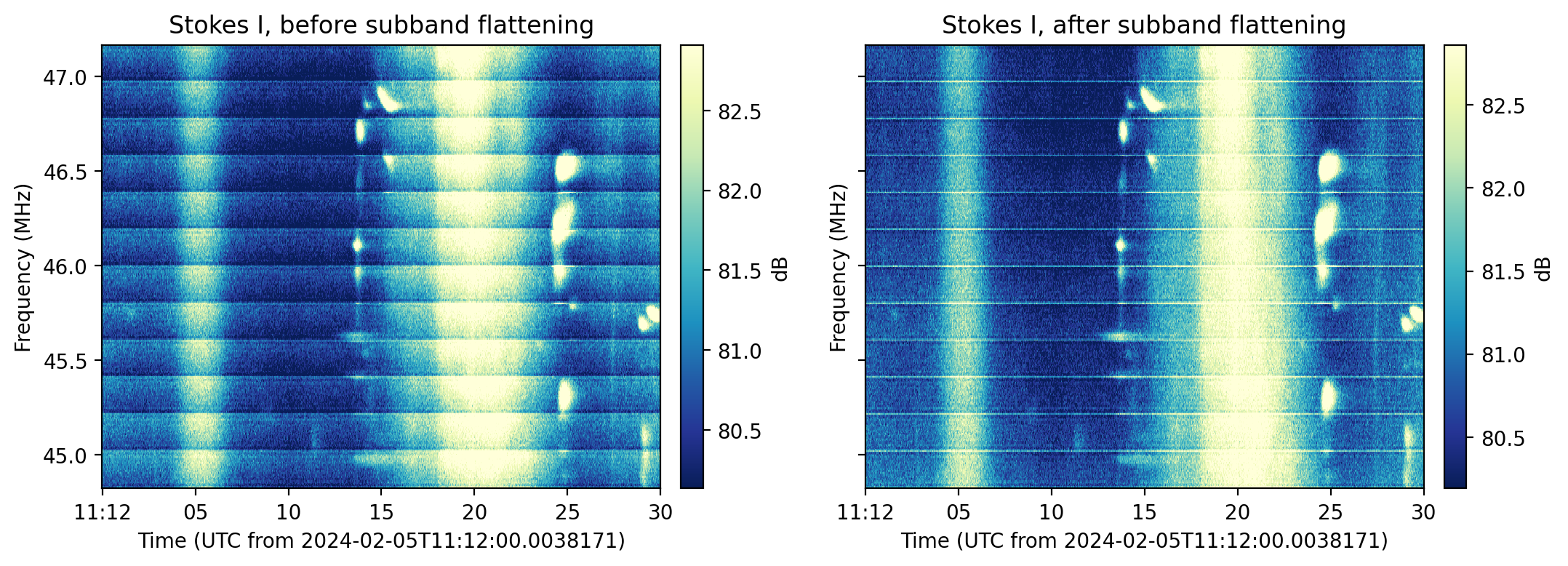
TFTaskto flatten each sub-band bandpass. Based on the temporal median over each suband, a linear correction is applied to flatten the signal. ThisTFTaskcalls theflatten_subband()function.Example
>>> from nenupy.io.tf import Spectra, TFTask, TFPipeline

>>> sp = Spectra("/my/file.spectra")
>>> sp.pipeline = TFPipeline(sp, TFTask.flatten_subband())
>>> data = sp.get(...)
Warning
This correction assumes that the signal’s spectrum could be considered flat at the sub-band resolution. The method is not recommended for data other than Stokes I.
- classmethod frequency_rebin()[source]
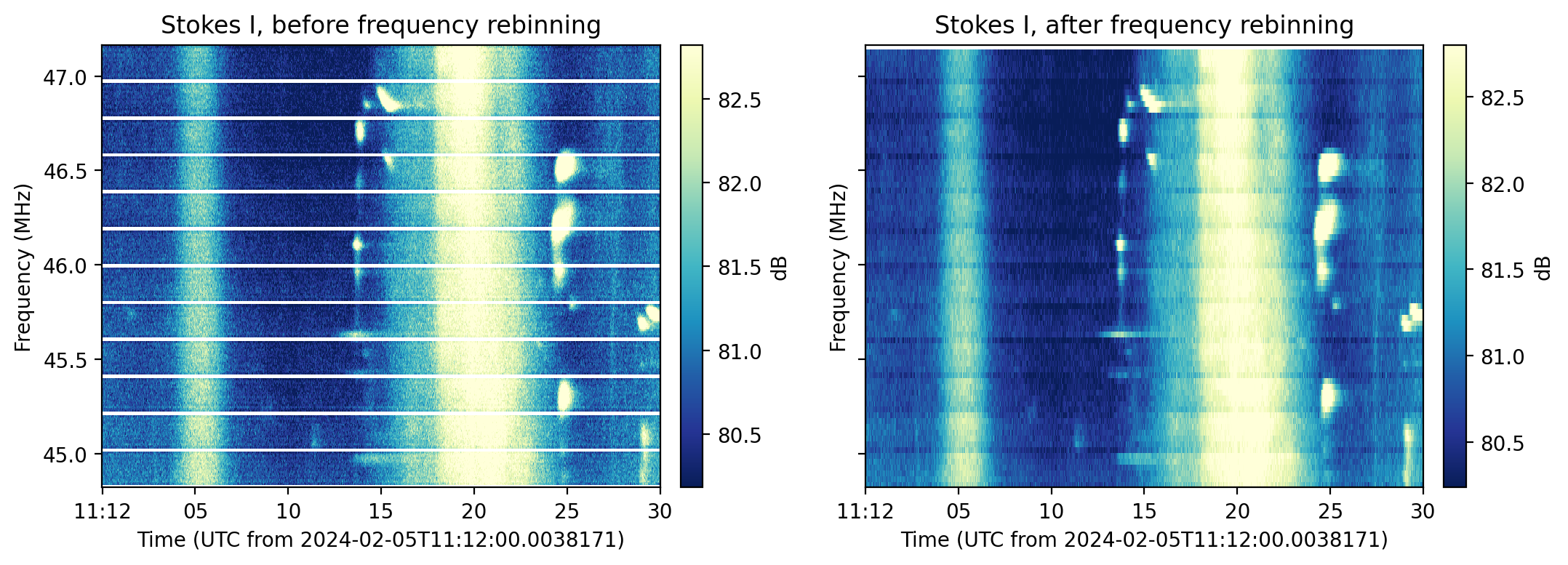
TFTaskto re-bin the data in frequency. The targetted frequency resolution is defined by the'rebin_df'argument, set inparameters. The minimum value is the frequency resolution of the data, i.e.df. ThisTFTaskcalls therebin_along_dimension()function.Example
>>> from nenupy.io.tf import Spectra, TFTask, TFPipeline
>>> import astropy.units as u

>>> sp = Spectra("/my/file.spectra")
>>> sp.pipeline = TFPipeline(sp, TFTask.frequency_rebin())
>>> result = sp.get(
        rebin_df=50 * u.kHz
    )
- classmethod get_stokes()[source]
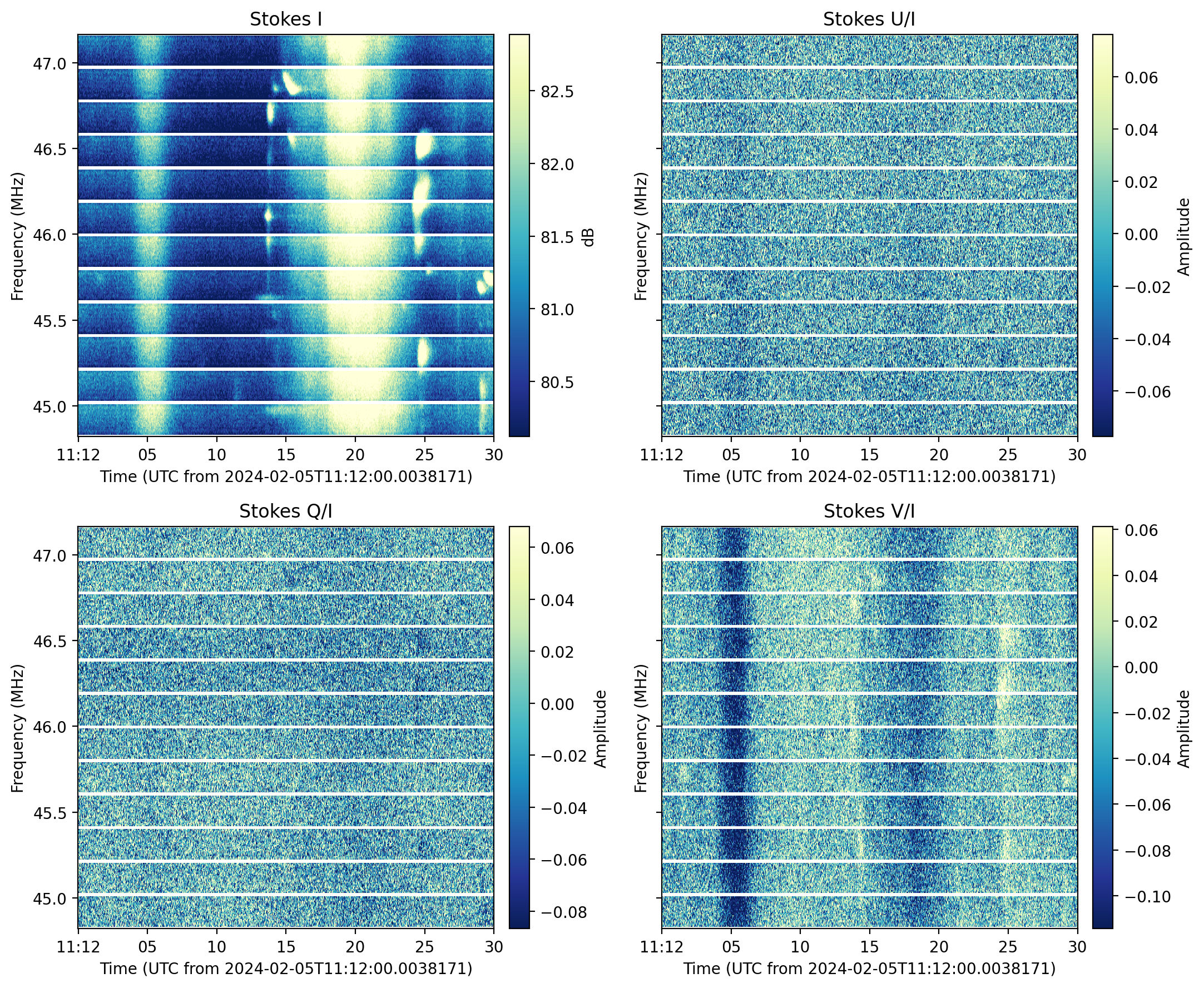
TFTaskto compute the Stokes parameters by callingcompute_stokes_parameters(). The computed Stokes parameters are defined by the'stokes'argument, set inparameters.Example
>>> from nenupy.io.tf import Spectra, TFTask, TFPipeline

>>> sp = Spectra("/my/file.spectra")
>>> sp.pipeline = TFPipeline(sp, TFTask.get_stokes())
>>> result = sp.get(stokes=["I", "U/I", "Q/I", "V/I"])

>>> result.plot(polarization="U/I") # to display
- property is_active
Attribute modified by
update()which tells whether the configured parameters enable the embedded function usage.- Returns:
Whether the task will be run by the pipeline or not
- Return type:
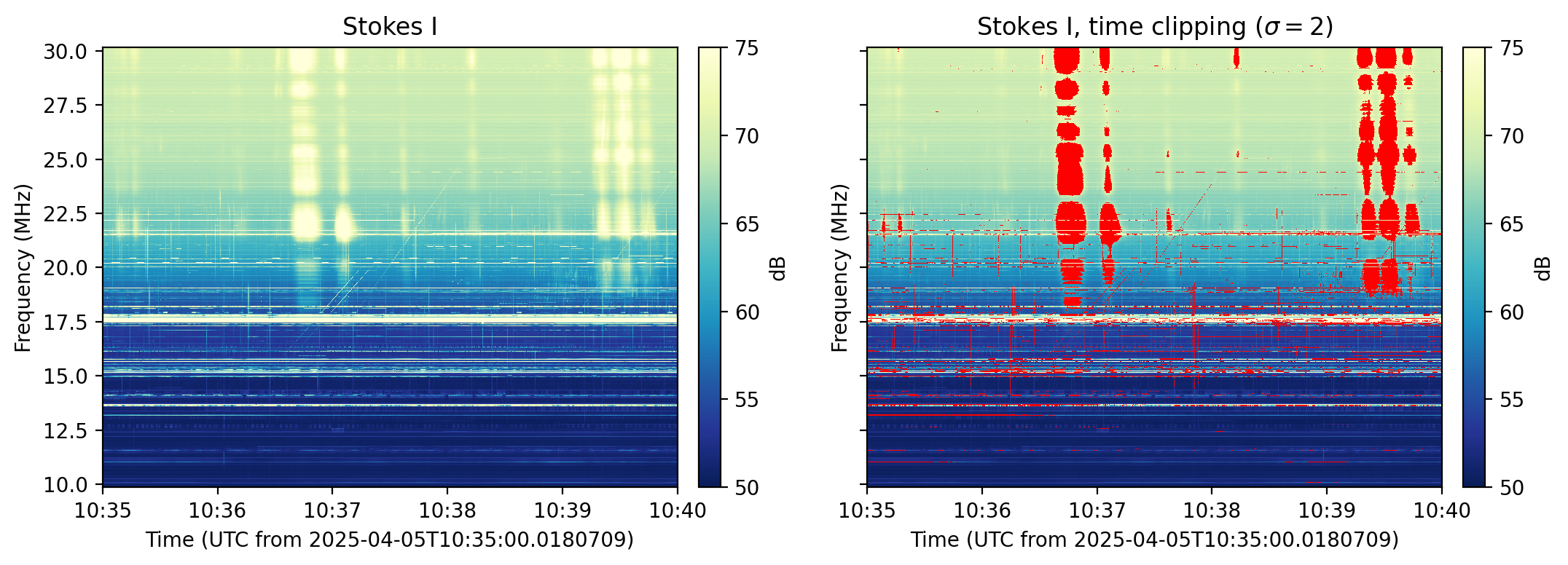
- classmethod mitigate_frequency_rfi(sigma_clip=2, polynomial_degree=5)[source]
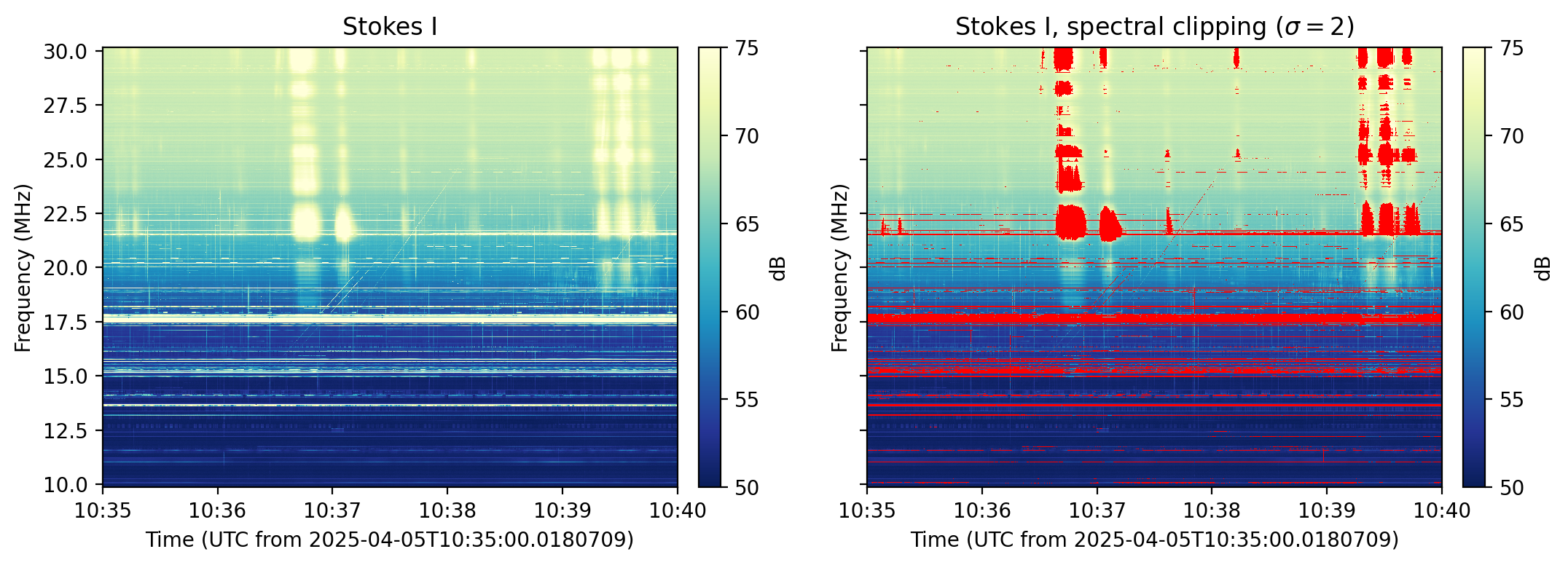
TFTaskto perform RFI mitigation by sigma clipping usingmitigate_rfi_along_axis(). This task specifically catch outliers by comparison with the smoothed median spectral profile of the selected dataset. Several instances of this task may be chained together to clip iteratively the data. To obtain better results, this can be combined withmitigate_time_rfi().- Parameters:
sigma_clip (
float, optional) – Argument passed tomitigate_rfi_along_axis(), by default 2polynomial_degree (int, optional) – Argument passed to
mitigate_rfi_along_axis(), by default 5
Example
>>> from nenupy.io.tf import Spectra, TFTask, TFPipeline

>>> sp = Spectra("/my/file.spectra")
>>> sp.pipeline = TFPipeline(sp, TFTask.mitigate_frequency_rfi(sigma_clip=2, polynomial_degree=4))
>>> result = sp.get()
- classmethod mitigate_time_rfi(sigma_clip=2, polynomial_degree=5)[source]
TFTaskto perform RFI mitigation by sigma clipping usingmitigate_rfi_along_axis(). This task specifically catch outliers by comparison with the smoothed median time profile of the selected dataset. Several instances of this task may be chained together to clip iteratively the data. To obtain better results, this can be combined withmitigate_frequency_rfi().- Parameters:
sigma_clip (
float, optional) – Argument passed tomitigate_rfi_along_axis(), by default 2polynomial_degree (int, optional) – Argument passed to
mitigate_rfi_along_axis(), by default 5
Example
>>> from nenupy.io.tf import Spectra, TFTask, TFPipeline

>>> sp = Spectra("/my/file.spectra")
>>> sp.pipeline = TFPipeline(sp, TFTask.mitigate_time_rfi(sigma_clip=2, polynomial_degree=4))
>>> result = sp.get()
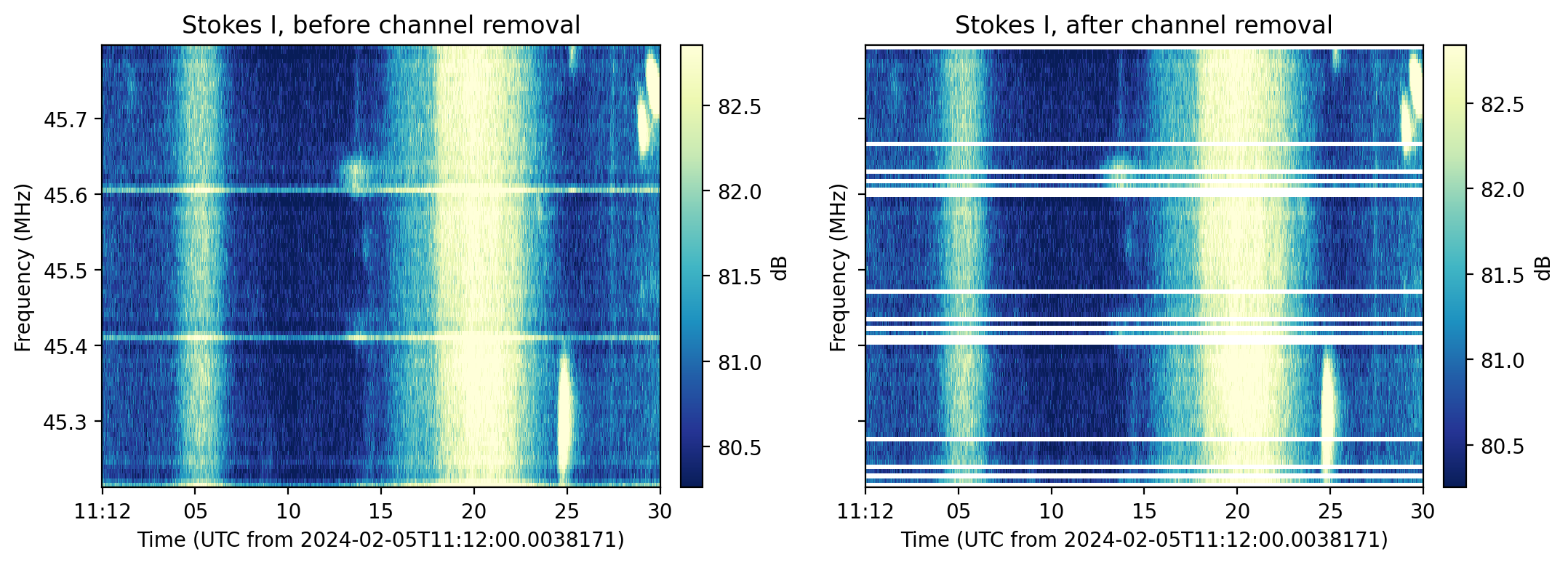
- classmethod remove_channels()[source]
TFTaskcallingremove_channels_per_subband()to set a list of sub-band channels toNaNvalues.Example
>>> from nenupy.io.tf import Spectra, TFTask, TFPipeline

>>> sp = Spectra("/my/file.spectra")
>>> sp.pipeline = TFPipeline(sp, TFTask.remove_channels())
>>> result = sp.get(
        remove_channels=[0, 2, 4, 10, -1]
    )
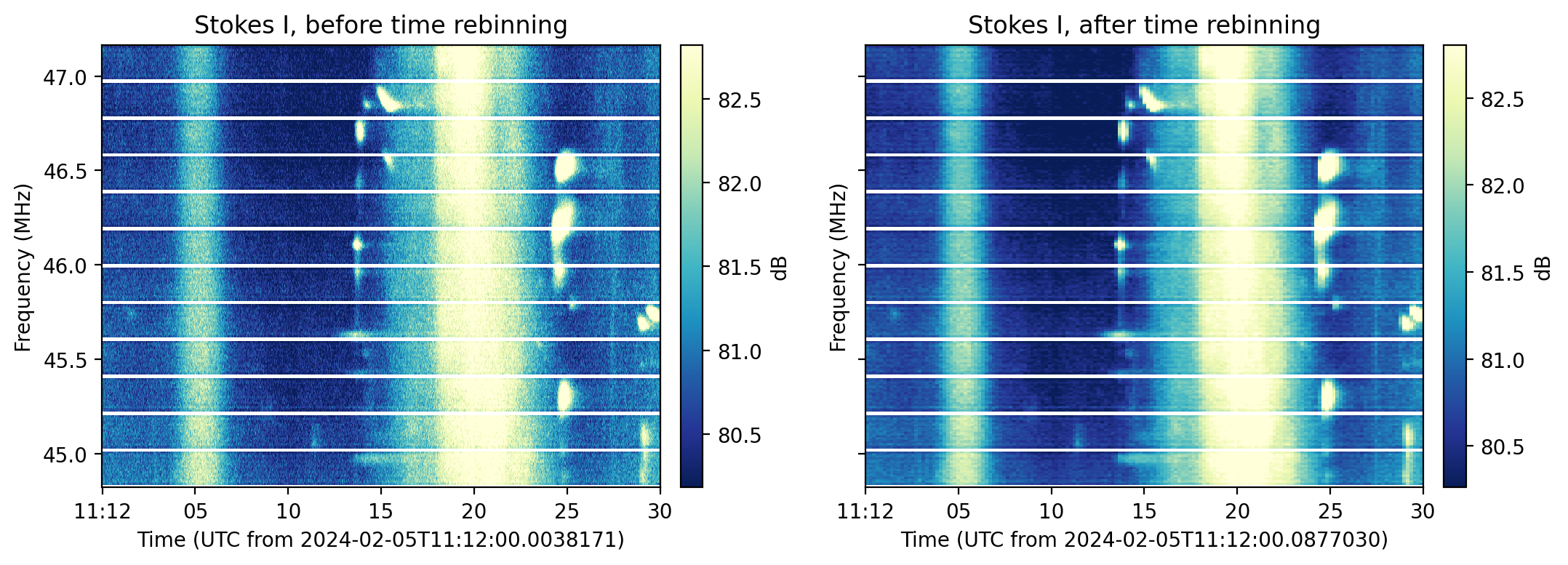
- classmethod time_rebin()[source]
TFTaskto re-bin the data in time. The targetted time resolution is defined by the'rebin_dt'argument, set inparameters. ThisTFTaskcalls therebin_along_dimension()function.Example
>>> from nenupy.io.tf import Spectra, TFTask, TFPipeline
>>> import astropy.units as u
>>> sp = Spectra("/my/file.spectra")
>>> sp.pipeline = TFPipeline(sp, TFTask.time_rebin())
Then, either perform a one_time application of the
rebin_dtparameter (that is forgotten after theget()call):>>> data = sp.get(..., rebin_dt=0.2*u.s,...)
Or, set it for further usage:
>>> sp.pipeline.parameters["rebin_dt"] = 0.2*u.s
>>> data = sp.get(...)
- update(parameters)[source]
Update the embedded function’s arguments to those listed in
parametersthat matchargs_to_update. Determine also if theTFTaskis active or not, i.e., if the configured parameters enable it to be run.- Parameters:
parameters (
TFPipelineParameters) – Pipeline parameters object, it must contain the parameter requested byargs_to_update.- Raises:
KeyError – Raised if the parameters listed in
args_to_updatedo not correspond with those listed inparameters.